
Player accounts
Player accounts are the end-user accounts created inside a generated Launcher Forge launcher. They are separate from developer dashboard accounts. The launcher handles:- Player registration.
- Player sign-in.
- Email verification.
- Password recovery.
- End-user sessions.
- Access to the game library.
A developer account manages the workspace, games, builds, keys, launchers, and player access.A player account signs in to the generated launcher and uses the games made available to that launcher.
Responsibilities by component
Launcher
Handles the player-facing authentication flow:
- Registration.
- Sign-in.
- Email verification.
- Password recovery.
- Session creation.
- Game acquisition and access.
Developer dashboard
Provides player administration:
- View registered accounts.
- Review verification and activity status.
- Review game access.
- Review private branch access.
- Delete unverified accounts.
- Ban verified or active players.
Player lifecycle
1. Open Players
Sign in to the Launcher Forge developer dashboard. In the left sidebar, select Players. The page lists the accounts registered through your launcher.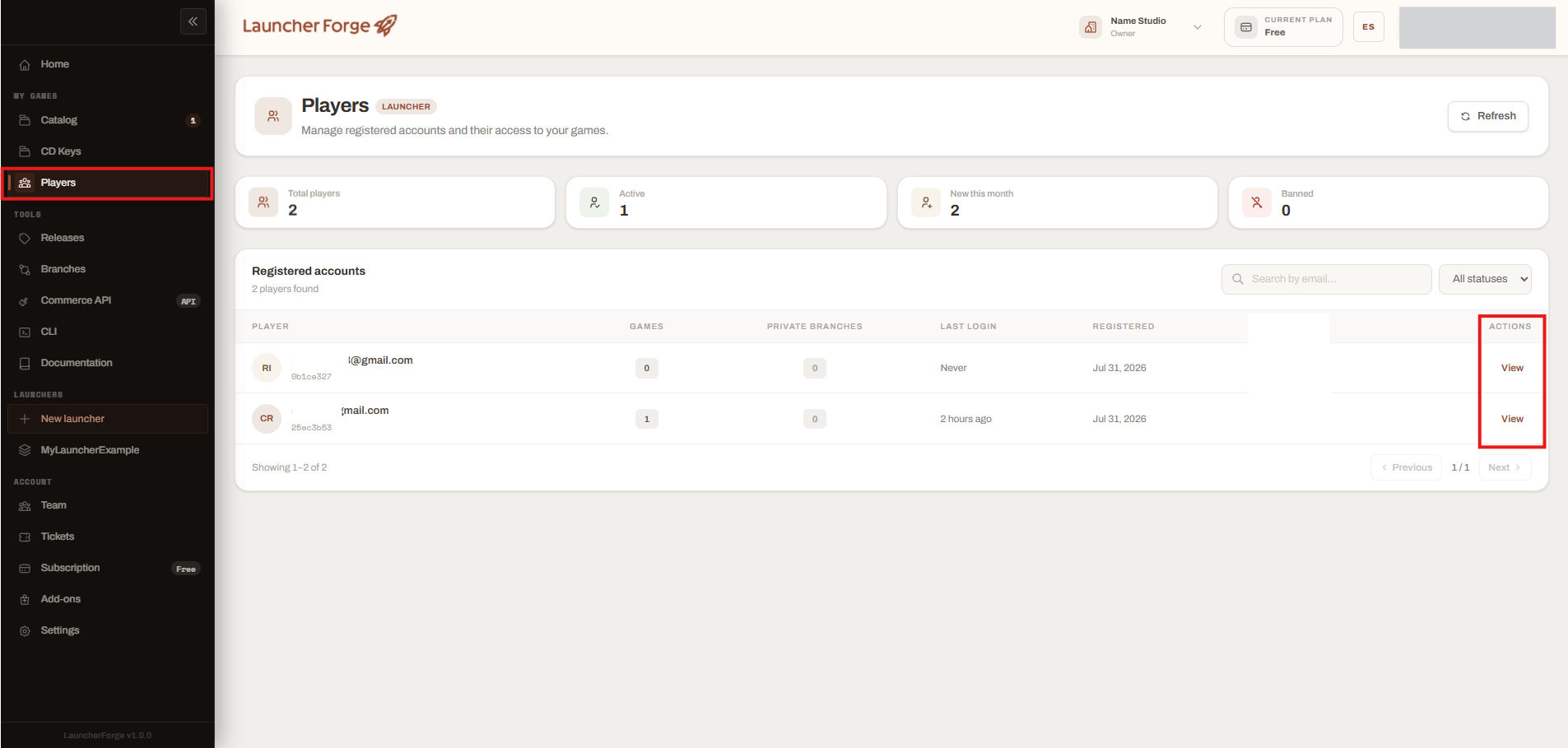
Open Players and review registered launcher accounts
Dashboard summary
The summary cards provide a quick overview of the launcher account population.
Use Refresh to retrieve the latest account data.
Registered accounts table
The table can display:
You can:
- Search by email.
- Filter accounts by status.
- Navigate between result pages.
- Open an account using View.
The Players section is scoped to the launcher. It does not list developer dashboard accounts.
2. View player details
Select View from the account row. Launcher Forge opens the Player details panel. The panel can display:- Email.
- Player UUID.
- Account status.
- Registration date.
- Last login.
- Email verification status.
- Associated launcher.
- Game access.
- Private branch access.
- Available administrative action.
Unverified accounts
A newly registered account can appear as Unverified when the email verification process has not been completed.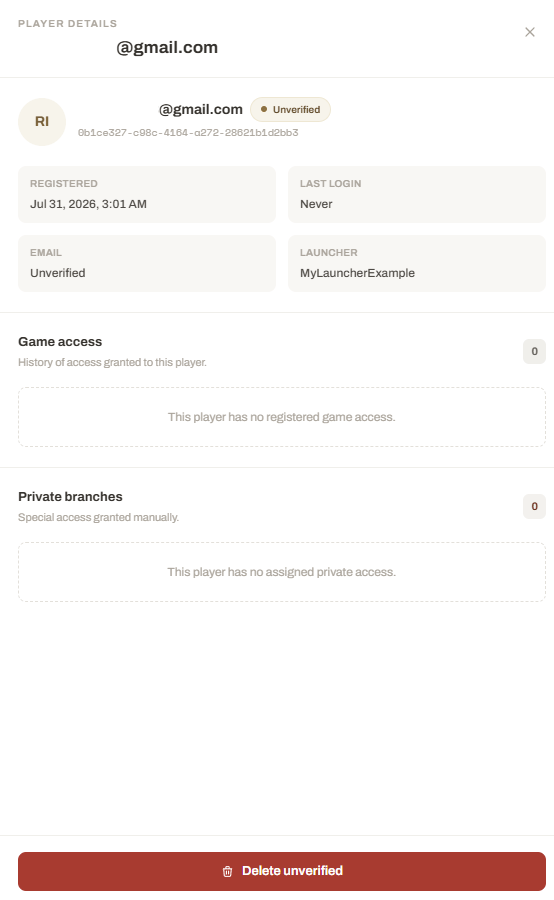
Review an unverified player account
- Unverified account status.
- Registration date.
- Last login, which can be
Never. - Email verification state.
- Launcher associated with the account.
- No registered game access, when none has been granted.
- No private branch access, when none has been assigned.
Delete an unverified account
When the email remains unverified, the developer can use Delete unverified. Use this action for cases such as:- Registration with an incorrect email address.
- Duplicate unverified account.
- Abandoned registration.
- Test account that was never verified.
- Unverified account that should not remain in the launcher.
Verified and active accounts
After verification and a successful launcher sign-in, the account can appear as Active.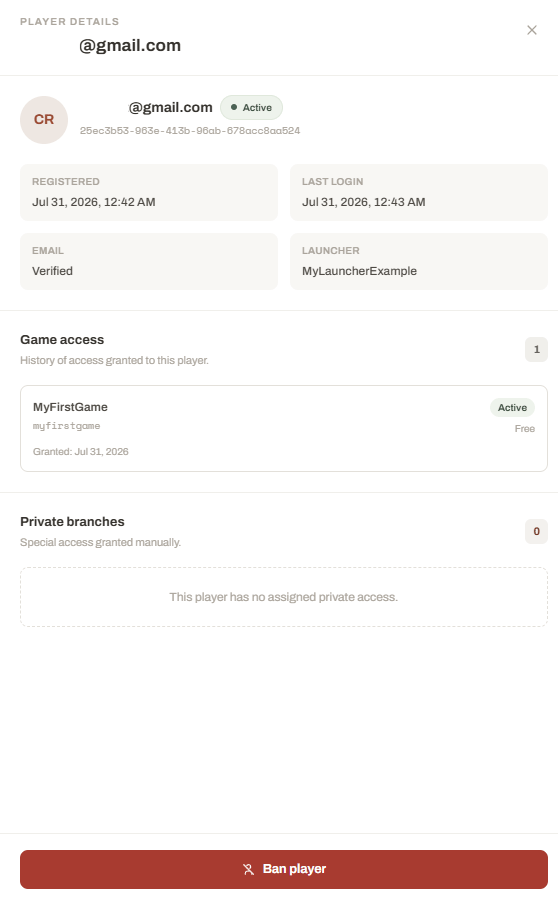
Review an active player and their game access
- Active status.
- Verified email.
- Registration date.
- Last login.
- Associated launcher.
- Games granted to the player.
- Access status for each game.
- Access type, such as free access.
- Date when access was granted.
- Assigned private branches.
- Ban player action.
Game access
The Game access section shows the games associated with the player account. An access record can include:
Game access can originate from:
- Acquiring a free game.
- Redeeming a valid CD key.
- Another supported developer access flow.
The player account must still use the launcher authentication flow before accessing its library.
Private branches
The Private branches section shows special branch access assigned to the player. Private branches can be used for:- Closed beta versions.
- QA testing.
- Press previews.
- Partner builds.
- Internal testing groups.
- Limited release channels.
Ban a player
For a verified or active account, the developer can use Ban player to restrict the account. Use this action when:- The account violates the game’s rules.
- Access must be suspended.
- The account is involved in abuse or unauthorized activity.
- A test account should no longer use the launcher.
- The developer needs to prevent further launcher access.
- Email.
- Player UUID.
- Current game access.
- Private branch assignments.
- Last login.
- Account status.
Account status overview
The exact recovery or unban controls depend on the actions currently available in the dashboard.
Sessions and restrictions
The launcher is responsible for creating and using end-user sessions. The developer dashboard does not perform the player’s interactive sign-in. Instead, it allows the developer to:- Review the last successful login.
- Review the current account status.
- Inspect the launcher associated with the account.
- Inspect granted game access.
- Inspect private branch access.
- Apply administrative restrictions.
Player authentication and launch validation
Player accounts and launch tokens solve different problems.Player accounts
Register and authenticate the end user inside the launcher and maintain their library and access.
Launch tokens
Validate the technical startup connection between the launcher and the game runtime.
Developer verification checklist
When reviewing player accounts, confirm:- The account belongs to the expected launcher.
- Email verification status is correct.
- Last login information is reasonable.
- Game access matches the intended entitlement.
- Private branch access is correctly assigned.
- Unverified accounts are deleted only when appropriate.
- Verified accounts are banned only after reviewing the account.
- Player identifiers are not exposed publicly.
- Player email addresses are treated as private information.
Player account management is working correctly when registration and authentication occur inside the launcher, while the developer can review access and apply restrictions from the dashboard.
Related guides
Password recovery
Understand the end-user password recovery flow.
Game keys
Generate and manage access keys for key-protected games.
Launch tokens
Configure launcher-game startup validation.